LED Backlit Wall Panels: Wiring, Drivers and Dimming (2026)
LED backlit wall panels, planned honestly: driver sizing math, voltage drop, dimmer matching, color, and the code lines not to cross.
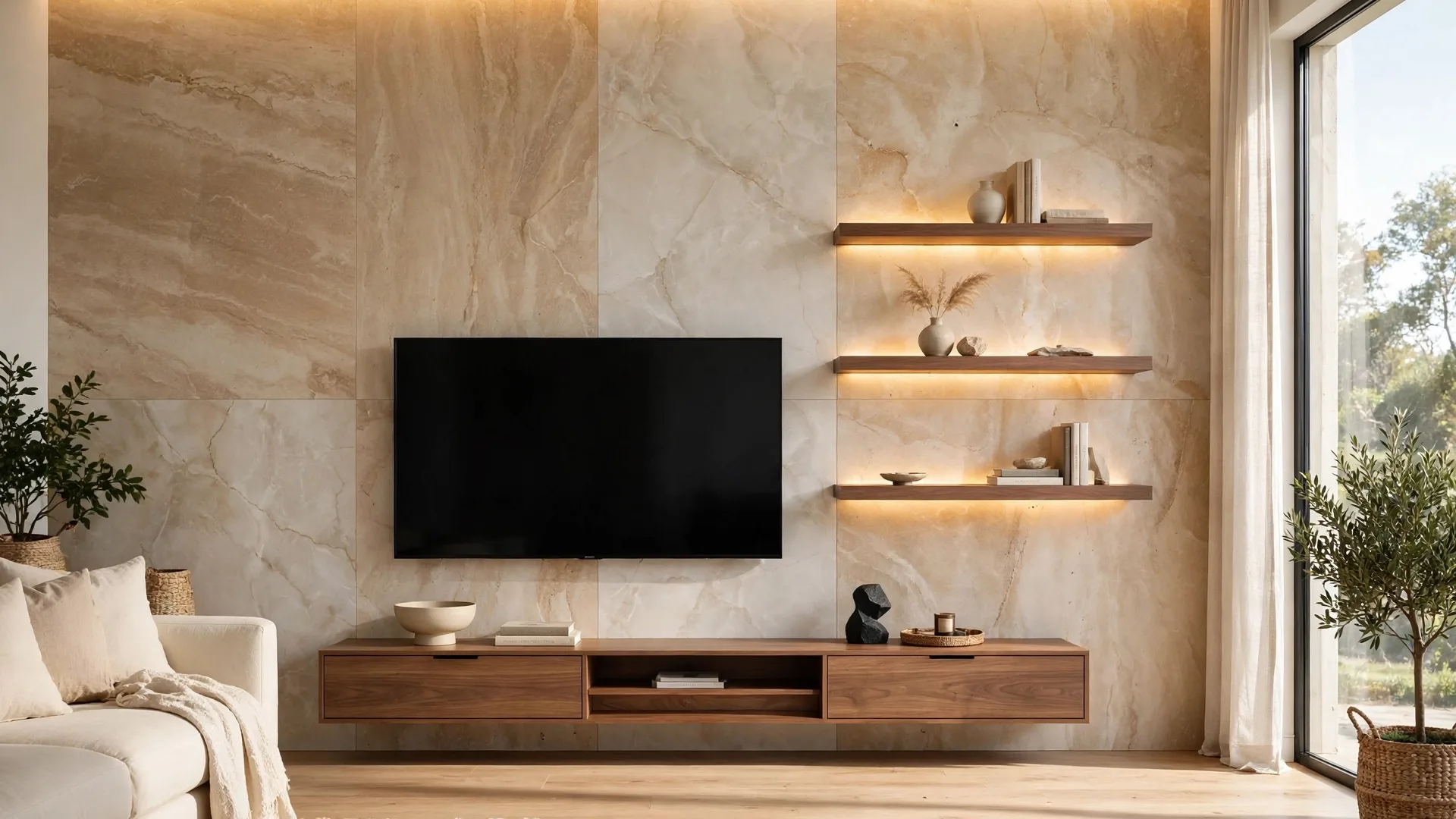
Every backlit wall photo that lands in my inbox carries the same hidden question. The glow looks simple: a warm halo above a stone-look panel wall, light spilling from behind a shelf, no wires anywhere. Then the buyer asks where the power supply goes, why one quote includes an electrician while another does not, and whether a strip from a marketplace listing can just plug in behind the TV. I install LED backlit wall panels for WOW Walls Studio here in South Florida, and I will give you the honest version: the light itself is the cheap, easy part. The electrical plan behind the panel – driver location, sizing, dimming, cable routes – is the part that decides whether the wall looks calm for years or flickers, dims at one end, and needs to be reopened in month two.
This article walks through that plan in the order I use on a real job: what the system is made of, where each part is allowed to live, the arithmetic I run before ordering anything (with one worked example you can check with a calculator), why long runs lose brightness, how dimming goes wrong and how the dimmer makers themselves say to fix it, which light color flatters travertine and marble-look finishes, and the code lines I will not cross, even when crossing them would make the photo cleaner.
The two sides of the system: 120 volts in, low voltage out
TL;DR: A backlit panel wall has two electrical sides. On one side is your home wiring at 120 volts AC. On the other side is the LED strip at 12 or 24 volts DC. Between them sits the driver, also sold as the power supply or transformer, which converts one to the other. The dimmer or controller lives on one of those sides, and which side it lives on decides what has to match what.
Start with the words, because half the confusion in lighting quotes is three names for one box. The driver is the power supply: a box that takes the alternating current from your wall circuit and delivers the steady direct current the strip runs on. LED strips for feature walls are low-voltage products, most often 12 volt or 24 volt. Nothing about the strip plugs straight into a wall outlet. The outlet feeds the driver, the driver feeds the controller or dimmer if there is one, and that chain feeds the strip.
The chain matters more than any single part. A wall can have a premium strip and still fail if the driver is undersized or the dimmer speaks a different electrical language than the driver. Think of the system as four links: the branch circuit and wall switch (the home circuit feeding the wall), the driver, the control (a wall dimmer, a low-voltage dimmer, a remote receiver, or an app controller), and the strip itself, cut to length and joined by connectors and distribution cables. Every link carries the full load of everything after it. That is why my sizing section below checks the whole chain and treats the lowest-rated link as the real limit.
Where the light physically sits depends on the wall design. On the large-format composite panel walls I install – travertine, marble-look, porcelain-look, veneer, leather, and velvet finishes on a bamboo composite core – the light usually lives in three places: a concealed cove at the top or side of the wall, a channel behind a floating shelf, or a halo gap behind the TV or a raised panel section. The strip itself is hidden; you see the wash of light on the panel face, which is the whole point. How that wash looks – even or blotchy, dotted or smooth – is decided by the channel, the diffuser (the translucent cover that spreads the light), and the distance between strip and surface, covered in the color and bench-test sections below. The panel build itself, and how shelves and TVs fix to structure behind it, is in my bamboo composite wall panels guide.
Where the driver and receiver live: accessible, ventilated, planned
TL;DR: The driver and the dimmer receiver go where a person can still reach them after the wall is finished: inside a media console, in an accessible cabinet or closet section, or behind a removable panel section – ventilated, not sealed inside the wall. A driver will need service or replacement one day, and a driver buried behind fixed panels turns a small part swap into wall surgery.
This is the first decision I pin down on every job, before lengths and wattages, because it constrains everything else. Installation guidance for wall-panel LED kits makes the same point in plain terms: keep the dimmer or receiver where it can be reached for pairing, inspection, or replacement, and do not trap connectors behind a fixed panel with no access (KingOrnan). The multi-strip wiring guide says it about the power supply itself: plan its location and cable route in advance, and do not seal it into an unventilated space or hide it permanently where it cannot be inspected or replaced (KingOrnan).
Drivers also make heat. A power supply running near its limit in a closed, unventilated cavity ages fast, and overload behavior can look like a lighting fault: the guide describes supplies that shut down, pulse, or restart repeatedly when overloaded, which reads to a homeowner as flashing lights (KingOrnan, citing manufacturer guidance). Ventilation and headroom are the same decision viewed from two sides: give the box air, and do not ask it to run at its ceiling all evening. The sizing math in the next section builds that headroom in.
My placement rules, learned the expensive way on other people's walls:
- The driver lives in furniture or in an access point, never entombed. Media console, cabinet interior, a closet that backs onto the wall, or a panel section designed to come off. If I cannot point at how a future technician reaches it, the layout is not finished.
- The receiver stays reachable too. Remote and app receivers need pairing and occasional resets. Invisible should describe the cables, not the service access – a line I borrow from the kit guidance because it is exactly right (KingOrnan).
- Low-voltage cable runs stay short and planned. The route from driver to strip is drawn before panels go up: through the planned service gap behind panels, into the cove, with gentle bends and no pinched connectors. Long detours cost brightness, as the voltage drop section shows.
- The TV gets its own plan. A recessed outlet behind the TV, placed on the drawing, plus a low-voltage pass-through for signal cables. What never happens is the TV power cord dropped inside the wall cavity – the code section below explains why that shortcut is prohibited, not just untidy.
Sizing the power supply: the math I run before ordering
TL;DR: Total load is strip watts per metre multiplied by installed metres. I then size the driver above that load with headroom – a common planning allowance is about 20 percent – and check the current in amps against every part in the chain: driver, controller, dimmer, splitter, and cables. The lowest-rated part sets the limit, and a splitter adds branches, not capacity.
Here is the calculation exactly as the multi-strip guide lays it out, with its worked example (KingOrnan). Total strip power equals watts per metre times total installed metres. If every strip is the same length, that is the number of strips times strip length times watts per metre. Current is watts divided by volts. The guide's example uses 24 volt strips at 11 watts per metre, four strips of 2.4 metres each: 4 x 2.4 x 11 = 105.6 watts, and 105.6 / 24 = 4.4 amps. Every component between the supply and the strips has to be suitable for more than that 4.4 amps, not only the supply itself.
Headroom comes next. Running a supply at exactly the calculated load leaves nothing for manufacturing tolerance, temperature, or cable loss, so the guide applies a planning allowance of about 20 percent: divide the load by 0.8. For the example, 105.6 / 0.8 = 132 watts, and the installer then considers the next standard supply size above that figure, subject to the rest of the chain (KingOrnan). Treat the 20 percent as a planning rule from this guidance, not a code number – the instructions for the specific supply govern.
| Strips (2.4 m each, 11 W/m, 24V) | Total length | Load | Current at 24V | Load with 20% margin |
|---|---|---|---|---|
| 2 | 4.8 m | 52.8 W | 2.2 A | 66 W |
| 4 | 9.6 m | 105.6 W | 4.4 A | 132 W |
| 6 | 14.4 m | 158.4 W | 6.6 A | 198 W |
| 8 | 19.2 m | 211.2 W | 8.8 A | 264 W |
| 10 | 24 m | 264 W | 11 A | 330 W |
The table is arithmetic from the guide's example figures (KingOrnan), and it shows the real lesson: there is no fixed answer to how many strips one supply can run. Two strips sit comfortably in a small matched kit. Eight or ten long strips usually want zoning – two or more independent groups, each with its own supply and controller, often still paired to one remote. Zoning shortens cable runs, cuts voltage drop, lowers the current through each splitter, and keeps one fault from darkening the whole wall (KingOrnan).
Two wiring rules sit under the math. First, separate strips connect in parallel through a splitter or distribution cable, so each strip receives the full rated voltage on its own branch; end-to-end daisy chaining sends current through the first strip and its connector, and should only be used where the product instructions explicitly allow it (KingOrnan). Second, never join the DC outputs of two ordinary power supplies together to make one bigger supply – supplies without a current-sharing function are not designed for it, and the guide points to the manufacturer guidance saying so; the correct answers are one larger supply or separate zones (KingOrnan). And a warning about the splitter itself: a four-way splitter gives you four connection points, and its electrical rating, not its socket count, tells you how much load it can carry (KingOrnan).
Voltage drop: why the far end of the strip goes dim
TL;DR: Voltage drop is the slow loss of voltage along a strip and its cables. The end far from the driver gets less voltage, so it runs dimmer and can shift color. Higher voltage helps: at the same wattage a 24 volt system draws half the current of a 12 volt system, and current is what the resistance of the run eats. Short runs, parallel branches, feeding long strips from both ends where the maker allows it, and zoning are the fixes.
The physics fits in one breath. The copper path inside a strip and its cables has resistance. Current flowing through resistance loses voltage along the way. The longer the run, the thinner the cable, and the higher the current, the more is lost before the far end (VST Lighting; Lightstec). The visible symptom is a gradient: bright near the feed, tired at the tail, and on color-changing strips, a color that drifts along the length.
Manufacturer test data shows the scale plainly and why slogans mislead. One maker's bench test measured a 15 metre strip fed from one end: the 12 volt version fell from 12.54 volts at the start to 8.9 volts at 15 metres, and the 24 volt version fell from 23.8 to 17 volts over the same length – a similar percentage, but spread across twice as many LEDs per unit, so the per-LED drop is about half (Lightstec). Read that correctly: 24 volts is not magic, and a very long single run still fades. What 24 volts buys you is half the current for the same power – the worked example above is 4.4 amps at 24 volts where a 12 volt version of the same wall would draw 8.8 amps – and lower current is what reduces loss, heat, and cable size pressure (VST Lighting; SignliteLED).
My working rules for panel walls:
- Default to 24 volts for full-height and full-width runs. 12 volts is fine for short shelf and niche runs; for a floor-to-ceiling cove I want the lower current.
- Feed branches in parallel, keep home runs short. Each vertical line gets its own branch from the splitter near the driver, instead of one heroic loop around the room (KingOrnan).
- For a long continuous line, plan the feed points on the drawing. Feeding from both ends, or injecting power at planned points, is a manufacturer-sanctioned answer to drop – but only in the configuration the specific product allows (SignliteLED; KingOrnan).
- Diagnose before blaming the supply. If wattage math checks out and one strip still looks weak, suspect drop, a thin or long branch cable, or a resistive connector before suspecting the driver (KingOrnan). The troubleshooting table at the end sorts symptoms this way.
One more honesty note: most of my panel walls are not 15 metre lab runs. A living room cove is typically two verticals, a top run, and shelf lines, zoned as in the table above. At those lengths, with 24 volts and parallel branches, drop is a planning item, not a visible defect. It becomes visible on exactly the jobs where nobody planned it.
Dimming without flicker: match the driver, the dimmer, and the strip
TL;DR: Flicker is usually a matching failure, not a broken strip. The strip must be dimmable, the driver must be a dimming driver of the type the dimmer expects, and the dimmer must be set so its lowest level stays inside the range the LED can actually hold. Lutron's own support guidance for flickering LEDs starts with checking that the lights are dimmable at all, and fixes low-end flicker by adjusting the dimmer's low-end trim.
There are two places dimming can happen, and mixing them up causes most of the problems I get called about. A wall dimmer on the 120 volt side works by chopping the AC feed, and it only behaves if the driver behind it is built for that kind of input – drivers are sold in specific dimming families, such as phase-cut (the wall-dimmer family: TRIAC, the leading-edge type, and ELV, electronic low voltage, the trailing-edge type) or 0-10 volt control (a separate low-voltage signal wire tells the driver how bright to be), and the wiring diagrams from driver makers treat those as distinct systems with distinct control wires (Ilumiyo; LTF driver diagrams). A low-voltage controller on the DC side dims between driver and strip, by remote, app, or touch, and it has its own current rating that the sizing section already checked. Both approaches work. What fails is the unplanned mix: a random wall dimmer feeding a non-dimming driver, or a smart bulb habit carried over to strips.
Lutron makes the dimmers in a large share of the homes I work in, and I follow its published troubleshooting order (Lutron Maestro support). First, check the lights themselves: many LEDs are not dimmable, including smart or connected bulbs, and a product marked non-dimmable or not for use with dimming devices has to be replaced with a dimmable one – Lutron points users to its LED Finder tool for tested combinations. Second, if lights flash or strobe, check the circuit topology: only one LED dimmer belongs on a circuit, with the other locations using a mechanical switch or a companion dimmer. Third, if lights flicker or shimmer only at the low end, adjust the low-end trim – the setting that raises the dimmer's floor to the lowest level the LED can hold steadily. Lutron gives the same low-end answer for buzzing that happens only at low levels, and for lights that drop out before the dimmer reaches the bottom: the LED is being dimmed below the range it was designed for, and the trim is how you stop asking it to go there (Lutron Maestro support).
Translate that to a panel wall and my rules are: specify the dimming method on the drawing, by name; buy the driver and control as a matched pair or a matched kit, not as separate bargains; bench-test the full dimming range before the wall closes, from full output down to the evening level the client will actually use; and set the low-end trim as part of commissioning, not as a callback. A wall that dims beautifully to a warm glow at 20 percent and never strobes is not luck. It is those four steps.
Color: temperature and rendering for stone-look finishes
TL;DR: For living rooms and bedrooms I spec warm light, 2700K to 3000K, and I want honest color rendering: CRI, the color rendering index, measures how faithfully a light shows colors against a reference, on a scale to 100, and high-quality LEDs can exceed 90. Warm, high-rendering light is what keeps a travertine finish looking like warm stone instead of turning it gray-green.
Color temperature, measured in kelvins, is the warmth dial: lower numbers read warm and golden, higher numbers read cool and blue-white. The US Department of Energy technical brief on LED color defines the pair of terms I use with clients: correlated color temperature (CCT) describes the perceived warm-or-cool color of the source, and the color rendering index measures how well the LED imitates the reference light, with 100 as the perfect score and high-quality LEDs achieving a CRI above 90 (DOE technical brief, summarized by Laser Focus World). That CRI point matters. A stone-look finish is a printed and embossed pattern of warm beiges, creams, and soft veining. A cheap strip with weak rendering, especially weak reds, flattens exactly those warm tones – the wall you approved from a sample in daylight goes dull under its own backlight.
My color rules for the finishes I install:
- 2700K to 3000K for living and sleeping spaces. This is the warm band my earlier guides use for travertine and marble-look walls, and it matches the warm end of the residential guidance in CCT explainers (2700K warm white to 3000K soft white for living areas). Tunable-white systems exist if a client wants flexibility, at the price of a more complex driver and control chain.
- One temperature across the whole wall. Zones can switch separately, but they must match in temperature and rendering, or the seam between zones becomes visible in the light itself.
- Ask for the CRI figure, and be suspicious when none exists. A strip sold with no rendering data is a gamble against a finish you chose for its color. The sample tests in my travertine guide apply here too: view the actual finish under the actual strip before the wall is built.
- Diffusion decides whether you see light or dots. A bare strip close to a surface shows individual LED points. A channel with a diffuser gives that even wash. So does a cove that bounces light onto the panel instead of exposing the strip. The slat-wall lighting guide makes the mechanical version of this point: the strip should sit hidden in its channel or gap, reading as part of the wall, off and on (KingOrnan). Test the exact stack – strip, channel, diffuser, distance – on the bench, lit, in a dark room, before install day.
The code red lines I will not cross
TL;DR: Flexible cords and power-supply cords must not be used as a substitute for the fixed wiring of a structure, run through holes in walls or ceilings, or concealed by walls, floors, or ceilings – that is NEC (the National Electrical Code) section 400.12 in summary, and it covers the TV power cord trick and the plug-in strip brick hidden in a wall alike. Line-voltage work – new circuits, outlets, hardwired drivers, wall dimmers – belongs to a licensed electrician working to the locally adopted code.
I am a panel installer, not your electrician. This section is planning guidance, not legal advice and not a substitute for your local code and inspector. Even so, the main rule is clear enough to build around. A trade summary of NEC Article 400 lists the prohibited uses of flexible cords, cord sets, and power-supply cords under section 400.12: not as a substitute for fixed wiring, not run through holes in walls, ceilings, or floors, not through doorways or windows, not attached to building surfaces, not concealed by walls, floors, or ceilings or above suspended ceilings, and not where subject to physical damage (ECMWeb, NEC Article 400 summary). The long-running electrician debate about TV cords lands in the same place: the correct install is a recessed outlet behind the TV, and the cord stays outside the wall cavity (Mike Holt forum discussion).
What that means on a backlit panel wall, concretely:
- No plug-in brick sealed behind panels. The driver is fed by a proper outlet in an accessible place, or hardwired by an electrician as part of the premises wiring – two legitimate routes. A power brick plugged into a hidden outlet inside a closed wall cavity is neither.
- No TV cord, HDMI-plus-power bundle, or extension lead threaded through the wall to reach a distant outlet. The outlet moves to the TV, installed properly, or the plan changes.
- Low voltage does not mean no rules. The DC side is safer to work around, but it still gets planned routes, protected cable, strain relief (a fitting that keeps tension off the electrical connections) where the product requires it, and connections made with power off – the kit guidance is explicit about switching off before connecting, disconnecting, or cutting strips (KingOrnan).
- New line-voltage work is an electrician line item in the quote. Adding a circuit, moving an outlet, or installing a hardwired dimmer is priced and scheduled as electrical work, the same category my cost guide already flags as the classic surprise line on TV walls – see my wall panels cost guide. If a quote for a backlit wall has no electrical line and the wall needs new power, the quote is incomplete, not clever.
- Fireplace and bathroom placements get extra discipline. The panel family I install carries a care limit of 50 degrees C at the panel face (Kosmos, from my earlier research), and LED parts near a fireplace follow the fireplace manual and local code, not optimism – the full heat method is in my fireplace accent wall guide. In bathrooms, light stays out of the wet zone unless every part is rated for it, and humidity planning follows my Florida humidity guide.
Bench test, then close the wall: my sequence and the fault table
TL;DR: I connect the complete system on a flat surface – strips, splitter, controller, driver – and run it at full brightness and through the whole dimming range before anything is cut or closed in. Cut only at the marked cut points, with power off, and cap the cut ends. After installation I test again at full output long enough for heat and overload behavior to show, before final cable concealment.
The kit and wiring guides are blunt about sequencing, and my job experience agrees with every word: faults are far easier to solve before cutting, and a system that works in a five-minute test can still misbehave after warming up (KingOrnan). So the sequence is fixed. Mark the layout on the wall with tape first, including light lines, driver home, and cable exits. Bench-test the full kit. Cut to length at the marked points only, cap the ends, fit and connect, test again in place at full brightness and across the dimming range, set the low-end trim, and only then finish concealment and trim.
When a finished wall misbehaves, I work the symptoms in this order – cheapest and most common first:
| Symptom | First suspect | What I check |
|---|---|---|
| Far end of a line is dimmer | Voltage drop | Branch length, cable size, feed point; zone or re-feed the line |
| Whole wall flashes or restarts | Overload protection cycling | Total watts vs driver rating with margin; controller and splitter ratings |
| Flicker only at low dim levels | Low-end mismatch | Low-end trim; dimmable status of driver and strip |
| Buzz at the dimmer | Dimmer and driver pairing | Tested combination lists; try the maker's recommended pairing |
| One branch dark, others fine | Connector or branch cable | Reseat and inspect the branch connector and splitter port |
| Works dimmed, fails at 100 percent | Load at full output | Sizing math at full watts, not at the dimmed level |
| Color differs between zones | Mixed product batches | Same strip model, temperature, and batch across zones |
None of that table needs a wall opened, which is the point of the access rules in section two. The driver, receiver, splitter, and connectors are all reachable on my installs, so diagnosis is a ladder and a multimeter, not a demolition.
A last maintenance note: a backlit wall needs little care, but not none. Dust the cove and shelf channels when you dust the room, because dust reads in grazing light. Keep the driver vents in the console or cabinet clear. And keep the paperwork – driver model, strip model, temperature, and the zone map – in the same folder as your panel warranty, so a replacement part five years from now is an order, not an investigation.
My verdict for South Florida homes
TL;DR: Plan the electrical first and the glow takes care of itself: 24 volt strips in parallel zones, a driver sized with headroom and living somewhere accessible and ventilated, a dimming pair bought as a matched set and trimmed at commissioning, warm 2700K to 3000K light with honest color rendering, and no cords inside walls. The walls that fail are the ones where the light was an afterthought added after the panels were already drawn.
Here is how I see it on real jobs across Palm Beach, Broward, and Miami-Dade. The backlight is worth doing – a travertine or marble-look wall under a warm cove wash is the single biggest difference between a panel wall that looks installed and one that looks staged, and my travertine guide and marble-look guide both lean on that warm light. The TV wall version of the same system is in my TV accent wall guide – read that one for layout and this one for the electrical plan underneath it.
What I will never tell you: that a plug-in strip kit from a listing is the same system as a planned, zoned, dimmable install; that a driver can be buried because it will probably be fine; that a bigger supply fixes a dimmer mismatch; or that the cord can go in the wall because nobody will see it. Run the math, bench-test the kit, keep the parts reachable, and the wall will glow the way the photo promised – evenly, warmly, and without a flicker you have to learn to ignore.
Sources
- ECMWeb, NEC Requirements for Flexible Cords and Fixture Wires (summary of NEC Article 400: permitted uses, and section 400.12 prohibited uses including substitution for fixed wiring, running through walls, and concealment by walls or ceilings). ecmweb.com
- Lutron support, Maestro LED dimmer troubleshooting (check dimmable status and the LED Finder tool, one dimmer per circuit, low-end trim adjustment for flicker, buzz, and drop-out at low levels). support.lutron.com
- KingOrnan, Can Multiple Wall Panel LED Strips Share One Power Supply? (parallel branches, load formula watts per metre times metres, amps equals watts divided by volts, 20 percent planning margin example, splitter and component ratings, zoning, overload signs, accessible ventilated supply location, bench testing). kingornan.com
- KingOrnan, How to Add LED Lighting to Acoustic Slat Wall Panels (fit in the gap, plan cable exit and power location, test the full kit before cutting, cut at marked points and cap ends, keep the dimmer or receiver accessible). kingornan.com
- Lightstec, LED Strip Light Voltage Drop: DC 12V vs DC 24V (bench measurements over 15 metres for both systems, per-LED drop comparison). lightstec.com
- VST Lighting, 12V vs 24V LED Strip: Best Choice for Long Runs (same wattage at 24 volts draws half the current; current, drop, and run-length comparison). vstlighting.com
- SignliteLED, When to Choose 12V, 24V, or 48V LED Strip Systems (run-length guidance by voltage, power injection for long runs). signliteled.com
- US Department of Energy technical brief on LED color, summarized by Laser Focus World (definitions of correlated color temperature and color rendering index; high-quality LEDs can achieve CRI above 90). laserfocusworld.com
- Ilumiyo, line-voltage wiring diagram reference (distinct wiring for on/off, 0-10 volt, ecosystem, tunable white, and DMX driver systems). ilumiyo.com
- Kosmos, bamboo charcoal panel product page (panel care guidance including the 50 degrees C heat limit, cited from my earlier panel research). en.kosmos.vn
- Mike Holt forum, TV power cord in wall discussion (electricians' consensus for a recessed outlet behind the TV; NEC 400.8 in the older numbering). forums.mikeholt.com
- WOW Walls Studio, Bamboo Composite Wall Panels: What They Are and Why They Last (2026).
- WOW Walls Studio, TV Accent Wall with Wood Slats and LED: 2026 Install Guide.
- WOW Walls Studio, Travertine Accent Wall Panels: Real Stone vs Composite (2026).
- WOW Walls Studio, Marble-Look Wall Panels: Calacatta Styles, Honest 2026 Guide.
- WOW Walls Studio, Fireplace Accent Wall with Panels: Heat Rules and Design (2026).
- WOW Walls Studio, Wall Panels in Florida Humidity: MDF vs PVC (2026).
- WOW Walls Studio, How Much Do Wall Panels Cost in 2026? Materials + Install.