Home Office Wall Panels: Background, Sound and Light (2026)
Home office wall panels behind your desk: which wall, how far to sit, finishes on camera, call lighting, honest sound limits, cables and Florida air.
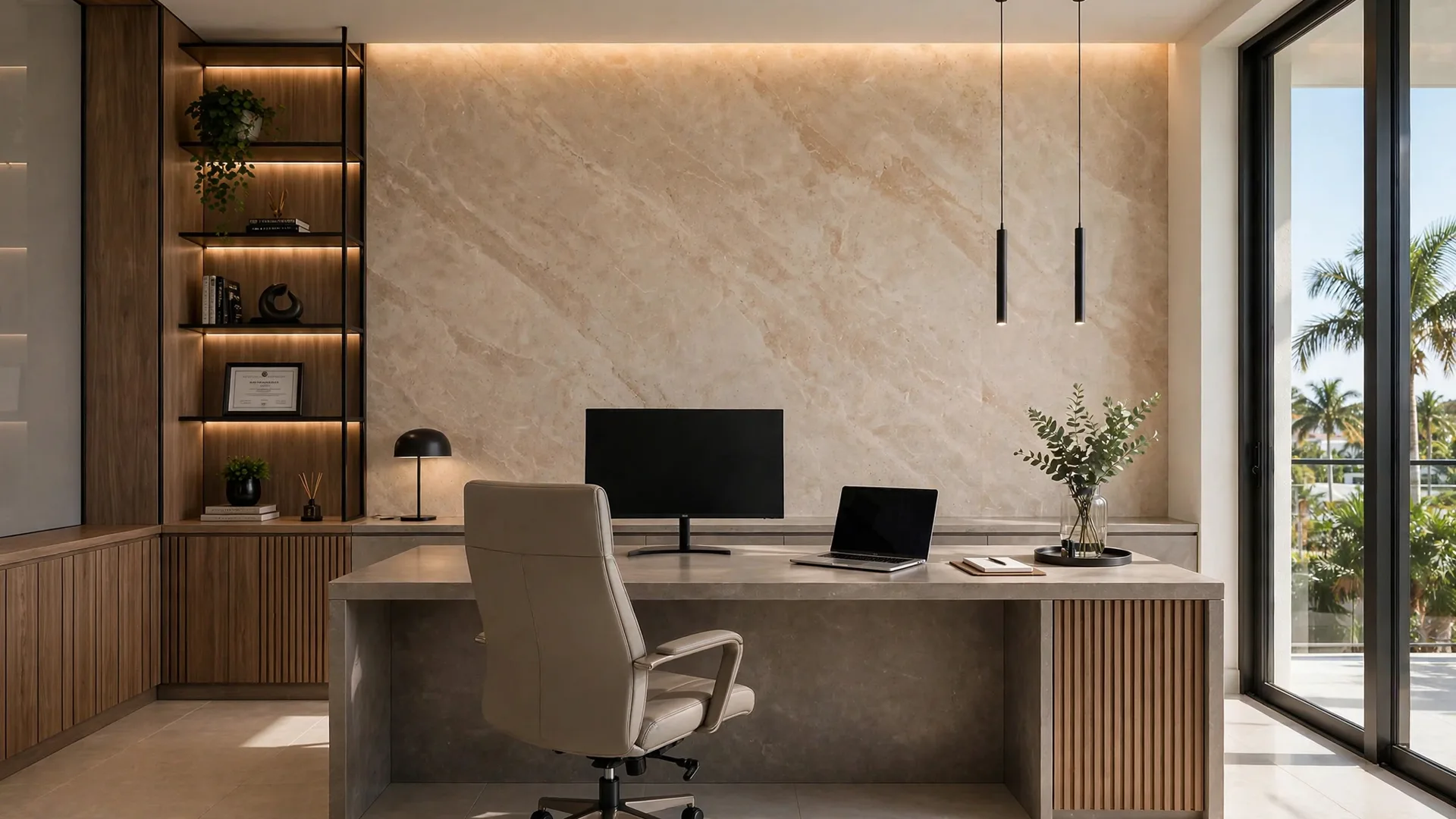
Your home office has one wall that works harder than the other three. It is the wall behind your desk, the one every client, manager and hiring panel sees on video calls, framed from your shoulders up, for hours a week. I install large-format home office wall panels for WOW Walls Studio here in South Florida, and most office projects start with the same complaint in different words: the room works fine, but on camera it looks temporary.
This guide covers the decisions that fix that. Which wall to panel, and what to do when your desk sits in a corner of a living room or a spare bedroom. How far to sit from the panel wall so you get depth on camera instead of a flat backdrop. Which finishes read well on video and which ones fight the camera. Where light should come from, and why a bright window behind you ruins more calls than any wall ever will. What panels honestly do for sound, stated plainly. Cables, outlets and shelves, planned before a panel is cut. The Florida humidity part. And what drives the price, without invented numbers.
The wall behind your desk is the one that matters
TL;DR: Panel the wall your camera faces: the wall behind your desk, with your chair on the panel side and your back to the panels (Hometalk). Angle the desk so that wall fills the frame behind your shoulders, where it does the most work on camera (Decorilla). In a shared room, panel only the field the camera sees and stop it at a real break – a corner, a column or a ceiling change.
Start with the camera and let it choose the wall. Guidance on home office accent walls for video calls is direct on this point: create the accent wall behind your desk, pull the desk out from the wall, sit with your chair on the accent-wall side facing away from it, and the only thing in view on a call is that wall and what you choose to put on it (Hometalk). That is the whole logic of an office panel wall. You are not decorating four walls. You are building the one background you will be judged against, at the size your webcam actually shows.
The panels I install are large-format composite sheets – a finish layer bonded over an engineered bamboo composite core (the build is covered in my bamboo composite wall panels guide) – with finishes that read as travertine, marble, stone, wood veneer (a thin real-wood finish layer), leather or velvet. Running floor to ceiling behind a desk, they give a call background with texture and depth that paint cannot match, and they give the room a main surface the rest of the furniture can stay quiet against.
The desk angle matters. Decorilla's background guidance makes the same point from the design side: angle the desk so the accent wall fills the frame behind your shoulders (Decorilla). Center the panel field on your chair. That is the version that works on camera. I tape the field on the wall, sit the client at the desk, and open the laptop camera before we talk about finishes. The frame on that screen is the drawing we work from.
Shared rooms and corners. If your office is a corner of a living room or a guest bedroom, the panel field itself becomes the boundary of the office, the same framing logic I use for a dining zone in an open plan in my dining room wall panels guide. Keep the field to the desk footprint plus the camera frame, and end it at a corner or another real architectural break. A field that stops mid-wall for no reason looks like a sample board, in the room and on camera.
How far to sit from the panel wall
TL;DR: Sit a few feet in front of the wall, with clear space behind your chair: guides put the desk about three feet out from the wall (Hometalk), one set-up guide calls about five feet behind you optimal at 5 to 6 feet with roughly an 8-foot span of wall to decorate at that distance (MakerBees), and background guidance sets a ceiling of about 8 to 10 feet behind you before the background stops being controlled (BrainStomp).
Distance is what separates a designed background from a head against a board. Sitting a few feet away from the wall behind you creates visual depth and keeps background elements from feeling stuck to your head on camera (Woodstock Outlet; Oakywood). Decorilla adds the texture point: sit a few feet in front of a backdrop so its pattern stays soft behind you instead of flattening into a solid block on screen (Decorilla).
Here is how I turn the published ranges into a room decision. At the tight end, a desk pulled about three feet out from the wall already gives you a clean, controlled frame in a small spare room (Hometalk). If the room allows it, the 5 to 6 foot zone one video set-up guide calls optimal gives the most natural depth, and at about five feet you should expect to decorate roughly an 8-foot span of wall to fill the frame (MakerBees). Past about 8 to 10 feet behind you, meeting guidance warns the background stops being yours: more of the room enters the frame, and so can people and pets walking through it (BrainStomp). Panel width follows from that math. A narrow field at a long distance leaves painted wall at the edges of every call.
Test it before anything is ordered. Sit at the desk, open the camera you actually use, and take a screenshot at your normal call distance. Slide the chair a foot each way and take two more. The screenshot where your outline separates cleanly from the wall and no painted edge shows at the sides is the geometry your panel field has to serve.
Finishes that read well on camera
TL;DR: Choose a finish with a little depth so your outline stays clear against it (Decorilla), and keep the background simple but not empty – a bare wall reads sterile on camera and a crowded one reads chaotic (Woodstock Outlet). Matte travertine-look and warm veneer are the calmest office backgrounds I install; strong marble veining and high gloss are the two finishes that most often fight a webcam.
A webcam is not an eye. It compresses, it sharpens edges, and it turns fine busy patterns into noise. That is why the background advice that repeats across guides is restraint: a completely blank wall can feel sterile, a cluttered one chaotic, and the sweet spot is intentional, designed simplicity – one piece of art, a plant, or shelves with a few spaced items (Woodstock Outlet). A large-format panel wall fits that brief well because the material itself is the interest. Large formats also mean fewer joints and a cleaner, easier surface to maintain (RD Marble).
Travertine-look. The warm, matte limestone look is where I start most office conversations, for the reasons in my travertine guide: low glare under office light, soft horizontal banding that stays calm behind a face, and a tone that separates from most skin tones and most office chairs. On camera it reads as soft texture.
Veneer. If your desk and storage are wood, a veneer panel wall in a related tone, a shade apart from the furniture, is the warmest background. Pale oak reads light and calm; walnut reads formal and suits client-facing calls where you want weight. Match the undertone and let the exact color differ.
Marble-look, with care. A formal office can carry marble-look, and the styles are compared in my marble-look guide, but keep veining soft. Bold, high-contrast veining moves behind your head on every call and pulls the eye off your face. The pairings that stay calm are quiet ones: a stone field with a single veneer return at the desk end, or travertine with one thin brass line as an accent. Two or three main materials at most – the wall is a background, and backgrounds win by staying in their place.
Judge every sample through your camera first. Prop the sample behind your chair, sit down, and record a one-minute test call to yourself in morning and evening light. The finish that still looks calm at 7 p.m. under your desk lamp is the one to order.
Light: face it, do not fight it
TL;DR: Put light on your face from the front or slightly to the side, and never sit with a bright window behind you – backlight turns you into a silhouette (HomeWorldDesign; BrainStomp). Place your screen at a right angle to the window, control daylight with blinds, and aim a desk lamp at the work surface so it does not reflect in the screen (HomeWorldDesign, citing OSHA and DOE guidance).
Lighting decides more of your call quality than the wall does, and the guides agree on the order of operations. Soft, directional light in front of you is what makes a face read clearly; whether the source is natural or artificial, sit facing the light (BrainStomp). A bright window behind you does the opposite – the camera exposes for the window and your face goes dark. If your panel wall has the window in it, that layout needs rethinking before panels: move the desk and leave the bulbs where they are.
For desk work itself, the placement rules are just as concrete. Home office lighting guidance based on OSHA and DOE references puts the screen at a right angle to windows so daylight comes from the side, uses blinds or curtains to control it, and aims an adjustable desk lamp at papers and the work surface without reflecting in the screen; for video calls, light should fall on your face from the front or slightly to the side (HomeWorldDesign). Overhead light alone points down and carves shadows into a face, which is why a front light matters even in a bright room.
On the panel wall itself, two things follow. First, matte and satin finishes forgive office light; a high-gloss finish mirrors your window and your lamp back into the camera. Second, if you add light on the wall – a sconce (a wall-mounted light) at the edge of the field, or a backlit detail – plan it as part of the panel drawing. The driver (the power-supply unit that feeds the light), dimming and wiring method behind lit panels is covered in my LED backlit wall panels guide. One vendor guide for call lighting suggests an adjustable LED panel light in the 3200K to 5600K range set near 4500K behind the camera (Illumina Backdrops) – treat that as a starting setting for your face light, then judge it on your own camera.
Sound, honestly: what panels do and do not do
TL;DR: Hard large-format panels are a visual surface, not a sound treatment. They will not soundproof your office and they will not, on their own, fix a strong echo in a bare room. Echo control comes mainly from soft surfaces – rug, curtains, upholstery, books – and I cover the measured side of that question in my acoustic panels guide.
This is the section where I lose some easy sales and keep my credibility. A home office in a spare bedroom with hard floors, bare walls and a glass door echoes on calls, and callers hear it as a bathroom-like ring on your voice. It is reasonable to hope a wall of panels fixes that. With the hard composite panels I install, it largely does not. Their face is a hard finish, closer in behavior to painted drywall than to a soft absorber, so the room's echo stays roughly where it was. What changes is the look, the durability and the light behavior of that wall.
Real echo control is unglamorous: a rug under the desk and chair, curtains over the window, something soft on at least one surface the sound hits, and books or storage breaking up a long bare wall. Do those first – they cost less than any wall and they work whether or not you panel. If measured acoustic treatment is the actual goal, that is a different product family with published ratings, and I lay out what those ratings do and do not promise in my acoustic slat wall panels guide.
What panels do contribute is smaller, and honest: a full-height field removes one large flat painted surface and replaces it with a jointed, textured one, and a veneer or velvet-finish field is less reflective to live with than a glossy painted wall. Clients tell me their offices feel calmer. I believe them, and I still will not sell you a panel wall as a sound fix. If echo is your main pain, spend on soft surfaces first and panel for the background you want to be seen against.
Cables, outlets and shelves: plan the cuts before the panels
TL;DR: Every outlet, switch, shelf bracket and monitor cable is a cut or a route in a panel field, so the desk layout is fixed on the drawing before panels are cut. Decide monitor position, outlet heights and shelf positions first; a panel wall punishes changes of mind more than paint does.
Paint forgives. You drill, you regret, you fill, you repaint. A finished panel does not offer that loop, so an office wall is planned backwards from the desk. Where the monitors sit decides where cables need to pass and where outlets need to land. Where a camera sits – at eye level, as desk set-up guides recommend (Oakywood) – decides what the top of the frame shows. Floating shelves, the background element several guides suggest in small numbers (Woodstock Outlet), need their brackets and their contents placed on the drawing: centered on a panel or centered on a joint, on purpose, at heights the camera frame actually includes.
My working order on an office job is fixed. First, desk position and chair distance, settled with the camera test from the distance section above. Second, the electrical map: existing outlets that stay, any outlet that moves, the cable route from desk to outlet that never crosses the visible field in a loose loop. Third, shelves and art, with weights and bracket positions. Fourth, only then, the panel layout – field width, joint positions, and which panel takes which cut. A client who wants to add a shelf a month later can still do it, but it means a planned cut into a finished surface. That difference is worth hearing before you order.
Florida humidity in a closed office
TL;DR: Keep indoor humidity below 60 percent, and ideally between 30 and 50 percent, as EPA guidance advises. A home office is often the room with the door closed and the AC vent working hardest; an engineered composite core moves less with moisture than solid wood, which is one reason it suits South Florida offices.
Offices have a specific Florida problem: the door stays closed for calls, the room heats up from people and screens, and the AC cycles for one small room instead of the whole house. Mold guidance for Florida homes consistently says indoor humidity should stay below 60 percent, with the EPA range of 30 to 50 percent as the ideal target (InComfortLiving, reporting EPA guidance). A wall finish cannot fix a humidity problem, but the wrong finish can suffer from one: materials that swell, soften or hold moisture against the wall are the risk in this state.
The composite core point is about movement. Solid wood swells and shrinks as moisture changes, opening joints; engineered composites are more dimensionally stable. I make the full climate case, including what happens to MDF (medium-density fiberboard) and PVC (polyvinyl chloride) here, in my Florida humidity guide. For an office, the practical rules are short: let the room's AC vent do its job, do not close the office off from the house air for days at a time, and do not panel a wall with an active leak or damp problem until that problem is fixed at its source.
What drives the price of a home office wall
TL;DR: Four drivers: the width of the field your camera frame needs, the finish, the number of cuts for outlets, shelves and lighting, and whether the design wraps a corner or runs one flat wall. A narrow field behind a desk in travertine-look and a full wall with shelves, a return and a lit detail are both "an office panel wall" – and they are different projects. The full cost structure is in my wall panels cost guide.
Width first, and here the office is luckier than other rooms: the field only has to serve the desk and the camera frame, so many office walls are narrower than a living room feature wall, and the count follows the drawing. Finish second: each finish carries its own line in an estimate, and a stone-and-veneer combination adds layout work a single finish does not have. Third, interruptions: every outlet, switch, shelf bracket and cable pass is a cut and a fitting, and any backlight or sconce adds a lighting system on top. Fourth, geometry: a corner wrap that defines an office in a shared room adds cutting and trim time a flat wall does not have.
That is why I do not quote an office wall from a photo alone, and why you should be careful with anyone who does. From a photo, a call-frame screenshot and your desk measurements I can draw the field, count the cuts, and tell you which layout your room honestly is. The estimate follows the drawing. The general anatomy of panel pricing is in my wall panels cost guide.
Questions I get about home office wall panels
TL;DR: The short answers: panel the wall behind your desk; sit a few feet from it, roughly three to six feet in most rooms; choose matte travertine-look or veneer for camera work; put light in front of your face, never a bright window behind you; do not buy panels as a sound fix; and plan every outlet and shelf before the panels are cut.
Which wall should I panel in a home office?
The wall your camera faces – the wall behind your desk, with your chair on the panel side facing away from it, so the call frame shows only that wall (Hometalk). Angle the desk so the wall fills the frame behind your shoulders (Decorilla).
How far should my desk be from the panel wall?
Guides give a working range: a desk pulled about three feet out from the wall works in a small room (Hometalk); one set-up guide calls 5 to 6 feet optimal and expects roughly an 8-foot span of wall at five feet (MakerBees); and meeting guidance keeps the wall within a few feet, at most about 8 to 10 feet behind you, so the background stays controlled (BrainStomp).
What finish looks best on video calls?
A finish with a little depth, so your outline stays clear against it (Decorilla), in a background kept simple but not empty (Woodstock Outlet). In practice I start with matte travertine-look or warm veneer, keep marble veining soft, and avoid high gloss, which mirrors windows and lamps into the camera.
Do wall panels help with echo in a home office?
Hard large-format panels do not soundproof a room and do not, on their own, fix a strong echo. Echo control comes mainly from soft surfaces – a rug, curtains, upholstery and books. Measured acoustic products are a different family, covered in my acoustic panels guide.
Where should light come from on video calls?
From in front of your face or slightly to the side, never from a bright window behind you (HomeWorldDesign; BrainStomp). Put your screen at a right angle to the window and control daylight with blinds (HomeWorldDesign).
Can I add shelves to a panel wall?
Yes, if they are planned: shelf positions and brackets go on the drawing before panels are cut, centered on a panel or on a joint on purpose. Adding a shelf later means a planned cut into a finished surface.
What about outlets and cables behind the desk?
They are mapped before cutting: existing outlets that stay, any that move, and a cable route that never crosses the visible field in a loose loop. Monitor and camera positions decide where cables need to pass.
Do home office wall panels work in Florida humidity?
Yes, with the room managed: keep indoor humidity below 60 percent and ideally between 30 and 50 percent, as EPA guidance advises. An engineered composite core is more dimensionally stable as humidity changes than solid wood, which swells and shrinks.
What affects the cost of home office wall panels?
Four drivers: the width of the field your camera frame needs, the finish you choose, the number of cuts for outlets, shelves and lighting, and whether the design wraps a corner or runs one flat wall. The estimate follows the drawing – the full cost structure is in my wall panels cost guide.
My verdict for South Florida home offices
TL;DR: Start from the camera frame: panel the wall behind your desk at the width your calls actually show, sit a few feet in front of it, choose a matte stone-look or a quiet stone-and-veneer mix, put light in front of your face, and fix echo with soft surfaces instead of asking a hard wall to do it. Do that, and your office stops looking temporary on the screen where it matters.
Here is how I see it on real jobs across Palm Beach, Broward, and Miami-Dade. The home office is the one room where a wall is also a work tool. Its failures are visible in every meeting: a panel field that misses the chair it was built for, a glossy finish mirroring a window, a desk pushed flat against the panels so the owner looks pasted onto the background, a shelf added later through a finished panel. Every one of those is visible on the drawing and in a one-minute camera test before a panel is ordered.
What I will never tell you: that a panel wall will soundproof your office; that gloss reads well on a webcam; that a price exists before the field is drawn; or that the wall you panel is a matter of taste alone when your camera has already chosen it for you. Send the photo and a screenshot of your call frame, tell me the desk size and where the window sits, and the drawing comes first – the finish, the light and the number all follow from it.
Sources
- Hometalk, Create a Home Office Accent Wall to Uplevel Your Zoom Calls (accent wall behind your desk, desk pulled about three feet out from the wall, chair on the accent-wall side). hometalk.com
- Decorilla, Home Office Background Ideas to Always Be Zoom Ready (angle the desk so the accent wall fills the frame behind your shoulders, sit a few feet in front of a backdrop, a shade with depth keeps your outline clear). decorilla.com
- BrainStomp, How to Make Your Home Office Look Professional for Online Meetings (wall within a few feet behind you, maximum about 8-10 feet, sit facing a light source). brainstomp.com
- MakerBees, Home Office Set-Up for Video Conferences (wall approximately 5 feet behind you, 5-6 feet optimal in that guide, about an 8-foot span of wall at 5 feet). themakerbees.com
- Woodstock Outlet, How to Create the Perfect Home Office Background for Virtual Meetings (sit a few feet away from the wall for depth, background simple but not empty). woodstockoutlet.com
- Oakywood, Best Desk Setup for Video Calls (camera at eye level, sit a few feet from the wall behind you, key light behind and to the side of the monitor). oakywood.shop
- HomeWorldDesign, Home Office Lighting: Desk Placement, Glare and Brightness (screen at a right angle to windows, blinds to control daylight, desk lamp without screen reflection, video-call light on the face from the front or slightly to the side; OSHA and DOE references). homeworlddesign.com
- Illumina Backdrops, Home Office Zoom Backgrounds (adjustable LED panel light 3200K to 5600K, setting near 4500K behind the camera – vendor guide). illuminabackdrops.com
- RD Marble, Benefits of Large Panel Walls (large panel formatting means fewer joints, cleaner appearance, easier maintenance). rdmarble.com
- Accio, Travertine Marble Wall Cladding FAQ (natural travertine porosity, sealing on installation and re-sealing every 1-3 years, pH-neutral cleaning). accio.com
- InComfortLiving, How Do You Prevent Mold in a Closed-Up Florida Home? (EPA guidance: indoor humidity below 60 percent, ideally between 30 and 50 percent). incomfortliving.com
- WOW Walls Studio, Bamboo Composite Wall Panels: What They Are and Why They Last (2026).
- WOW Walls Studio, Travertine Accent Wall Panels: Real Stone vs Composite (2026).
- WOW Walls Studio, Marble-Look Wall Panels: Calacatta Styles, Honest 2026 Guide.
- WOW Walls Studio, LED Backlit Wall Panels: Wiring, Drivers and Dimming (2026).
- WOW Walls Studio, Acoustic Slat Wall Panels: NRC, Echo and Honest Truth (2026).
- WOW Walls Studio, Dining Room Wall Panels: Full-Height, Protection and Finishes (2026).
- WOW Walls Studio, Wall Panels in Florida Humidity: MDF vs PVC (2026).
- WOW Walls Studio, How Much Do Wall Panels Cost in 2026? Materials + Install.